Mpower AI
Easy to run

Custom AI tools and apps for small businesses, built around how you work.

When off-the-shelf software doesn't fit, we build the tool that does. Quote builders, visualizers, customer portals, job boards, and AI that handles the paperwork, so your team has more time for customers.

Fixed scope. Fixed price, agreed before we start. You own the code.

Sound familiar?

The work nobody signed up for.

  1. 01

    The same information gets typed into three different systems.

  2. 02

    Quotes wait until someone has time to price them.

  3. 03

    PDFs and emails pile up until someone renames and files each one.

  4. 04

    Invoices go out days after the work is done.

  5. 05

    Customers call to ask where things stand.

  6. 06

    The software you pay for does most of what you need, and the rest lives in spreadsheets.

If your team says “we've always done it this way,” there may be hours in there to give back.

What we build

Three kinds of builds.

Quick Win

One workflow, handled.

One repetitive job taken off your team's plate by an AI workflow, running in draft-and-approve mode.

  • Invoices drafted from completed work
  • PDFs and emails read, renamed, and filed
  • Next-day schedules drafted for your dispatcher
  • A weekly numbers snapshot

Customer-Facing Tool

Help customers decide faster.

A tool on your website that answers the question customers ask before they buy.

  • Color and product visualizers
  • Estimate and quote builders
  • Booking flows
  • Customer status portals

Business App

The system your team runs on.

A web app built around your process when off-the-shelf software doesn't fit.

  • Work-order and dispatch boards
  • Field tech mobile views
  • Job closeouts
  • Client portals and intake from emails and PDF tickets

Customer-facing tools also make you easier to choose. That's why they show up there too.

Built and shipped

Things we've built.

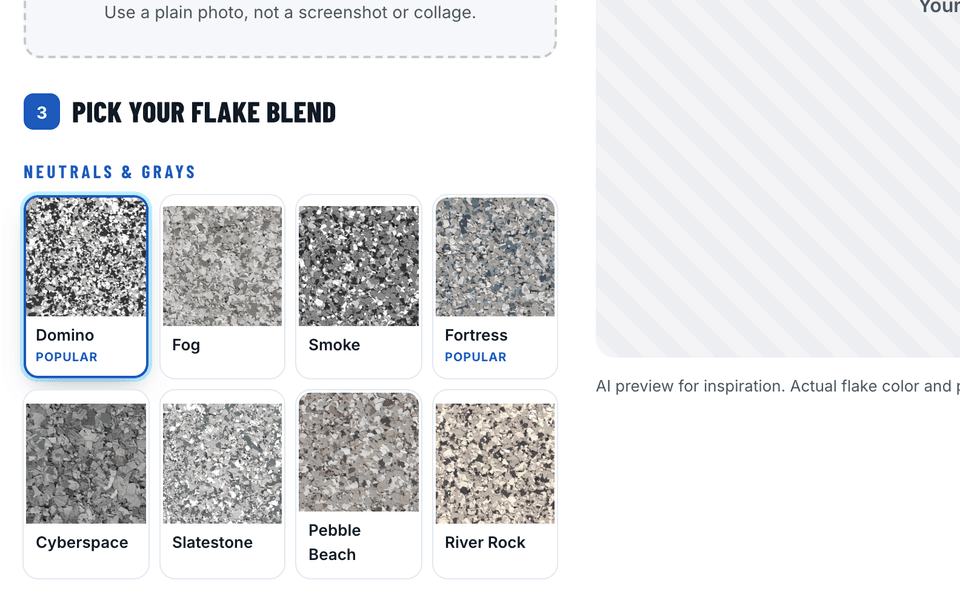
Diamond Concrete Coatings: An AI floor visualizer

Diamond Concrete Coatings

An AI floor visualizer

Homeowners pick their space, upload a photo, and try flake blends on their own floor, right on the website.

Try a demo version
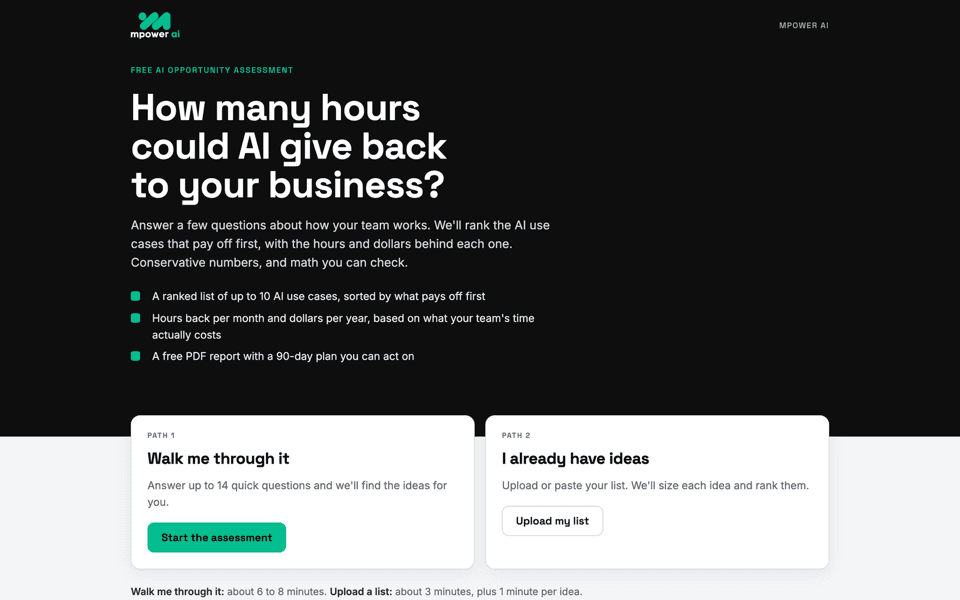
Mpower AI: The AI Opportunity Assessment

Mpower AI

The AI Opportunity Assessment

Reads a business's website, asks up to 14 questions, ranks 45 AI use cases by hours and dollars, and builds a branded PDF in the browser.

Take the assessment
Zare Communications logo

Zare Communications

A work-order platform for a multi-state low-voltage contractor

Dispatch board and calendar, a mobile view for field techs, accounting closeouts with vendor profit, a client portal, quote PDFs, AI intake of PDF tickets, and field time billed from start and end times.

Zipco Gutters logo

Zipco Gutters

Estimate to contract, in one flow

The price is entered once in GoHighLevel, and the signed agreement moves the deal forward on its own. It's part of the full system we run for Zipco, alongside their website, SEO and AEO, ads, social media, and follow-up automation.

What we build with.

The job decides the tool, and every build runs in accounts you own. Not every build needs AI inside it. When a plain tool does the job better, that's what we build.

  • Claude
  • OpenAI
  • Grok
  • Cursor
  • HubSpot
  • GoHighLevel
  • Next.js
  • Vercel
How a build works

From free assessment to working tool, with no surprises.

  1. 1

    Take the free assessment

    About 6 to 8 minutes. Your best use cases, ranked by hours and dollars. You keep the PDF.

  2. 2

    Talk it through for 15 minutes

    We check your numbers with you, show you your #1 use case working, and tell you honestly if it's not worth building.

  3. 3

    Get a Build Plan

    A short, fixed-fee step, about one week. We map the process, sketch the screens, and write the fixed scope and price. The plan and screens are yours either way.

  4. 4

    Build it, with weekly demos

    Fixed price, agreed before we start. You see progress every week, it launches in draft-and-approve mode, and you have admin access from day one.

  5. 5

    Keep it running, or take it in-house

    An optional monthly care plan covers hosting, fixes, and small changes. Or hand it to your team. It's yours.

The fine print, in plain English

You own all of it.

The code, the accounts it runs in, your data, and the Build Plan and screens. If you leave, everything goes with you. You stay because it works, not because you're locked in.

We'll tell you when AI isn't the answer.

Sometimes the fix is a better form, a cleaner spreadsheet, or a setting in software you already pay for. We plan on conservative numbers, so a use case that saves an hour a month ranks low, even if it sounds exciting.

What happens to your data.

We connect only what the tool needs. You decide what AI does on its own and what a person approves first. We write down what data goes where and who can see it, and you get a copy. Healthcare, legal, and financial rules get covered before anything is built.

What we don't do.

We don't set up or look after computers, networks, email accounts, or phone systems, and we don't sell security. We build tools for specific jobs on top of the systems you already have. For questions about your computers or network, your IT provider is the right call.

Questions

Straight answers.

How much does a custom app cost for a small business?

It depends on the scope. That's why the Build Plan comes first: it maps the work and sets a fixed price before anything is built, so there are no surprises.

How long does a build take?

A single workflow is often a few weeks. Larger apps take longer. The Build Plan sets the timeline, and you see a demo every week along the way.

Can you build a quote calculator or estimate tool for my website?

Yes. We build estimate and quote tools around your real pricing rules, so customers get a useful number and your team gets a qualified lead.

Can you build a product or color visualizer?

Yes. The floor visualizer we built for Diamond Concrete Coatings is one example: customers try flake blends on a photo of their own floor before they call. You can try a demo version yourself.

Do I need to replace my current software?

Usually not. We build around the tools you already use and connect them where it helps.

What if it breaks after launch?

The optional care plan covers fixes and small changes. Or we hand it to your team with everything they need to run it.

Who owns the code?

You do. The code, the accounts, and the data are yours from day one.

Start small

Start with the task your team would most like to hand off.

Take the free assessment to see which tasks are worth building for. Or book a call and tell us what's taking up your team's time.